Tax overview
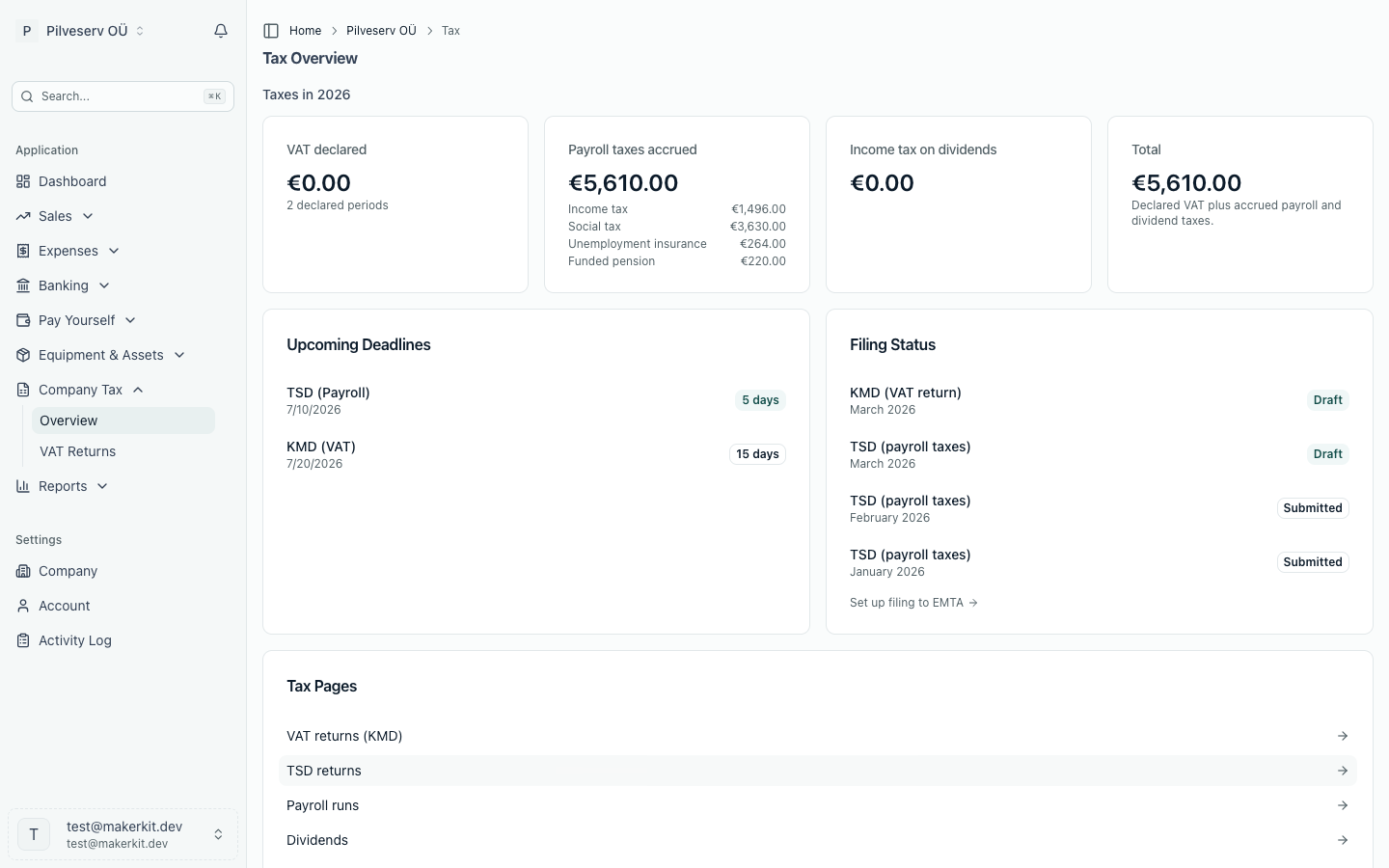
One dashboard for every tax your Estonian OÜ pays: upcoming KMD and TSD deadlines, tax accrued so far this year, the status of your latest filings and quick links to each tax page.
Your company's taxes live in more than one place — VAT on the KMD, payroll taxes on the TSD, corporate income tax when you pay dividends. The Tax overview brings the headline numbers together on a single page, so you can see what's due, what's built up this year and where each return stands without opening every screen. It's the landing page of the Company Tax group in the sidebar; VAT Returns sits just beneath it.
The overview reports what's already in your books and files nothing. The one thing it books is a motor vehicle tax notice you record on its card (see below). Think of it as the dashboard you glance at before a deadline.
Upcoming deadlines
Estonia's two recurring filing deadlines are shown with the days remaining, closest first:
- KMD (VAT return) — due the 20th of the month after each monthly period. The KMD is monthly unless EMTA has approved a longer period for your company. If your VAT period in company settings is set to quarterly, the date shown is the 20th of the month after each quarter (if EMTA set a different period, the return is due by the 20th after that period ends), because you file that return in e-MTA yourself. The VD stays monthly (VAT Act § 28 lg 2) (Arvello prepares monthly returns only and doesn't send a monthly KMD reminder email then). The KMD line appears for the periods a VAT registration reaches, so after a deregistration it stays until the last registered period's return is due, and it doesn't appear at all for a company that has never been VAT registered.
- TSD (payroll taxes) — due the 10th of the month after any salary or dividend payment.
When the 10th or the 20th falls on a weekend or public holiday, the date shown is the next working day, which is when the return is actually due.
The payment is due on the same date as the return. Tax paid late carries interest of 0.06% a day, about 22% a year, from the day after the due date until the money reaches EMTA. EMTA works it out and sends an interest claim; it doesn't send one for less than €10. An Overdue label in Arvello only means a due date has passed; Arvello doesn't track whether EMTA has received the payment. Official text: Maksukorralduse seadus § 115, § 117 and § 119.
In the run-up to the annual report deadline, a line for it appears here too, linking through to the annual reports area. The report is due six months after your financial year ends, taken from the financial years in company settings: 30 June for a year ending 31 December, 31 March for a year ending 30 September (the date the e-Business Register shows), and the next working day when that date is a weekend or public holiday. The deadline reminder emails follow the same date, so a company whose year ends in September is reminded from October, before its March deadline.
Motor vehicle tax
If the company owns a vehicle subject to motor vehicle tax (a car, a van, pickup or other goods vehicle up to 3.5 tonnes gross weight, a motorcycle or quad, an off-road vehicle or certain wheeled tractors, MSMS § 2), or is entered as its responsible user where the owner is a leasing company, a non-resident individual or a foreign company, it pays motor vehicle tax (Motor Vehicle Tax Act § 5). Tick The company owns a vehicle, or is its registered responsible user in company settings and the deadline list shows the next instalment, with a Motor vehicle tax card further down.
- The yearly tax is owed by whoever is the owner on 1 January. EMTA puts the tax notice in e-MTA by 15 February, and half is due by 15 June, the other half by 15 December (§ 7 lg 4). Selling the vehicle in Estonia during the year doesn't reduce it (§ 10 lg 2). If it's removed from the register (exported or scrapped, for example), EMTA shortens the year and replaces the notice (§ 7¹): reverse the old entry and record the new one, as below. The replacement notice gives its own due date for anything still owed; the deadline shown in Arvello doesn't know it, so follow the notice.
- A vehicle first registered during the year, or returned to the register after a temporary deletion or (in 2025 and 2026 only) with its register entry restored, owes tax for the rest of that year, on a notice issued within 15 working days. Record it as A vehicle registered during the year, dated the day it was registered or returned. Registered by 30 September, it's due by 15 December; registered later, by 15 June of the next year (§ 8).
EMTA calculates the tax; Arvello doesn't. Select Record tax notice on the card and enter the amount from the notice. EMTA's yearly notice covers every vehicle the company owned on 1 January, so record its total once for the year; a vehicle registered later gets its own notice and its own entry, recorded with the vehicle's registration number. The deadline shown follows the notices you've recorded, so a vehicle registered in the autumn shows next June. Arvello books it as an expense and as a tax liability (2200) on the day the tax arose: 1 January, or the day of first registration. Your payments to EMTA, categorised as Tax payment, then clear that liability instead of leaving 2200 in debit. Because the notice is booked on the day the tax arose, your year-end balance sheet carries exactly this year's tax that's still unpaid (including a vehicle registered in the autumn whose tax is due next June), and never next year's: that arises only on its own 1 January, so Arvello refuses to record it earlier. If EMTA replaces a notice, reverse the old entry in the general ledger, then record the new one. A notice is always reversed on its own date (1 January, or its registration day): the reversal dialog fills that date in and doesn't let you change it. Both then land in the same financial year, even when the replacement comes after your year end. If that year is already locked, ask your accountant how to book the difference.
INF 14 in January
Some payments have to be declared even when they carry no tax. By 1 February (or the next working day), declare on form INF 14 in e-MTA what the company paid in the previous year as compensation for using a personal car for work with a trip log kept (the whole amount, including any part above the tax-free limit, which is also declared on TSD annex 4; without a trip log the payment is salary on TSD annex 1 and goes on neither), health and sports costs within the yearly limit per person, if the company offered them to all its employees (otherwise they're a taxable fringe benefit on TSD annex 4), and formal (level) education costs that aren't taxed as a fringe benefit (Income Tax Act §§ 56¹, 56² and 56⁴). From 1 January the deadline appears in the list, with an INF 14 card explaining it. It shows for every company, because whether one is owed depends on last year's payments, which Arvello doesn't record per person. Arvello doesn't record these payments per person yet, so the declaration is prepared from your own records. Part IV of the form, on loans to the company's shareholders or members, its parent company or the parent's other subsidiaries (§§ 50² and 56⁵), is due by the 20th of the month after each quarter.
Taxes this year
Four cards total up what your company has declared or accrued so far in the current calendar year:
- VAT declared — the net VAT payable across the KMD returns you've submitted or that EMTA has accepted. Where a period was later amended, the amendment supersedes the original.
- Payroll taxes accrued — income tax, social tax, unemployment insurance and funded pension, summed from your approved, paid and filed payroll runs and broken down beneath the total.
- Income tax on dividends — the corporate income tax on distributions you've approved or paid.
- Total — the three added together.
These figures say what has been declared or accrued from your bookkeeping, which isn't the same as what has cleared your bank. To reconcile tax payments against your account, use the tax payment summary in Banking.
VAT registration threshold
While your company isn't VAT registered, a VAT registration threshold card on the Tax overview, VAT Returns and your dashboard estimates this year's taxable turnover from your issued sales invoices, against the EUR 40,000 at which VAT registration becomes mandatory. Only turnover supplied in Estonia counts towards it, so the card leaves out lines coded Intra-community services (0%) or Export of services (0%): their place of supply is outside Estonia. Lines coded Not subject to VAT count in full, because that code doesn't say whether a line is a service whose place of supply is abroad, goods sent from Estonia or a service supplied here. The two service codes are available whether or not your company is VAT registered. The card also leaves out IOSS sales to customers in other EU countries (see EU import scheme (IOSS)).
Filing status and quick links
The Filing status card shows your latest KMD and the most recent TSD returns with their status — draft, submitted, accepted — each linking to the full return. If you haven't confirmed your EMTA filing setup yet, a prompt here points you to it. A Tax pages panel gathers direct links to VAT returns, TSD returns, payroll runs, dividends and the pay strategy comparison.