Team members & roles
Invite your accountant, bookkeeper or co-founder to your Estonian company books, and choose roles that decide which areas each person can see and change.
Your company in Arvello doesn't have to be a solo act. The Members tab of Settings → Company is where you bring in a co-founder, an accountant or anyone else who works in the books, each with their own login — far better than sharing a password and hoping.
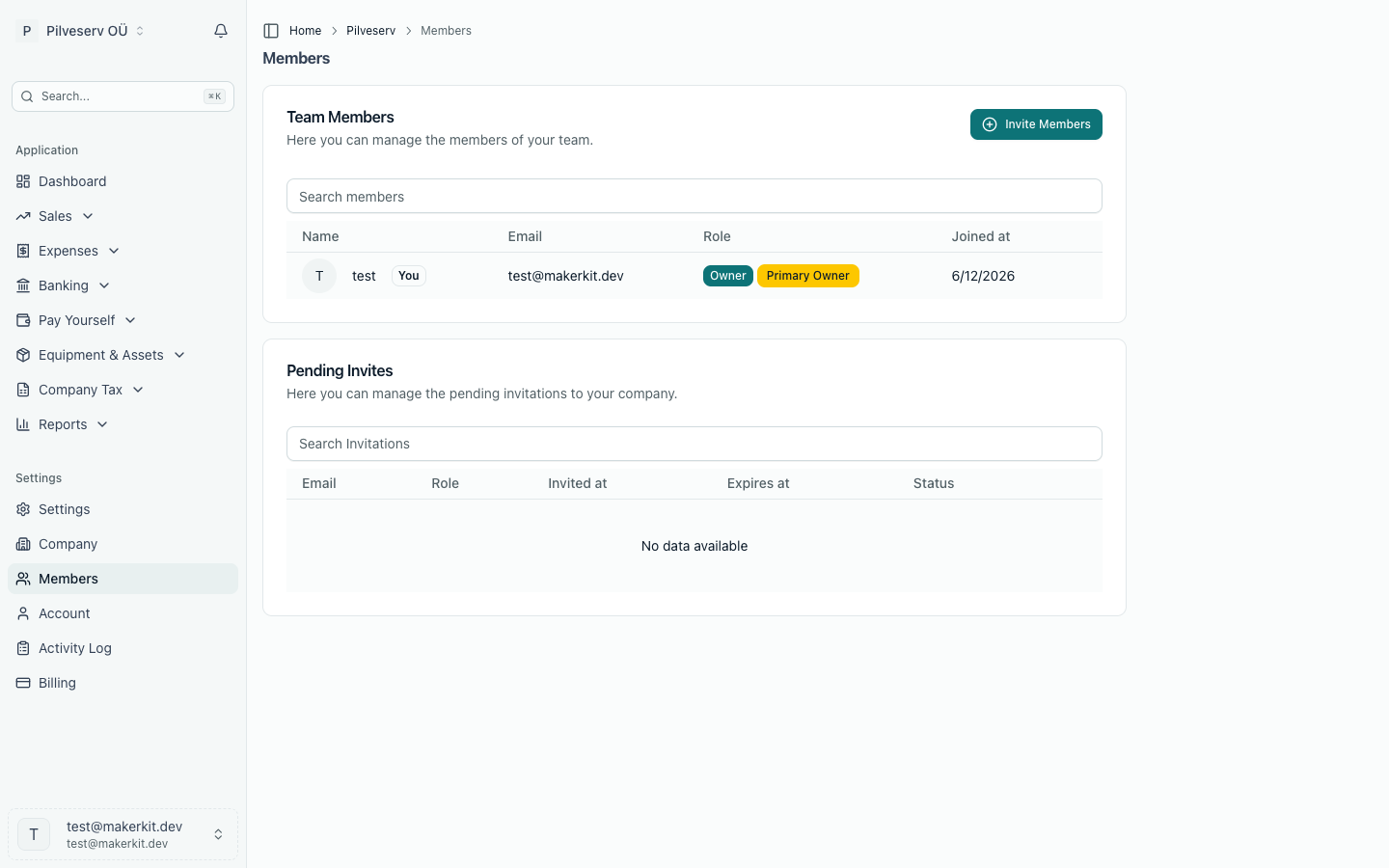
What each person can see and change depends on their roles. Arvello splits the books into areas — sales, expenses, banking, the ledger and reports, VAT returns, payroll, dividends, the annual report and company settings — and every role gives read or change access to some of them.
Inviting someone
Press Invite Members, enter their email address, and tick one or more roles; each role shows what it allows. You can add several addresses in one go with Add another one — everyone in that batch gets the same roles. Each person gets an email with a link to join the company — if they don't have an Arvello account yet, they create one on the way in.
Invitations wait in the Pending Invites list until accepted. From there you can change the roles an invitation will give, resend one that's been missed, renew one that's expired, or delete one sent in error. Inviting requires an active subscription, and your plan sets how many team members a company can have — more on that below.
Owners and members
Everyone on the team is either an owner or a member.
- An owner can do everything, including billing and managing the team. Owners don't need roles.
- A member can do what their roles allow, and nothing else.
One owner additionally carries the Primary Owner badge: whoever created the company (or later received ownership). Only the primary owner can transfer ownership to someone else — it's confirmed by typing TRANSFER — or delete the company entirely.
Roles
A member has one or more roles, and can do everything their roles allow together. Viewer and Payroll viewer, for example, add up to read-only access to everything.
- Admin — full access to the books, payroll, settings, team members and billing. Can't delete the company, transfer ownership or change an owner's access.
- Accountant — for your accountant or accounting firm. Manages the books, payroll, dividends and the annual report, and can file returns with EMTA. Can't change the company's details, bank account or integrations, or manage the team.
- Bookkeeper — manages sales, expenses, banking, the ledger and VAT returns. Can't open payroll pages or file returns. Matching a bank payment as a dividend received needs dividends access, so a Bookkeeper leaves those payments to someone who has it. Accountants and Bookkeepers can't change the company's details, but in Company settings they can still set the VAT number, the VAT period and whether the company has a motor vehicle.
- Sales — creates and sends invoices, manages customers and records payments received. Can't see the rest of the books.
- Payroll & HR — manages people, payroll runs, payslips and TSD returns. Can't file returns or see the rest of the books.
- Filer — reviews VAT and TSD returns and files them with EMTA, with read-only access to payroll. Filing can't be undone: a mistake is fixed by filing a correction. A Filer files a return as it was prepared; recording different figures needs someone who manages that area.
- Viewer — read-only access to the books, VAT returns and the annual report.
- Payroll viewer — read-only access to people, payroll runs, payslips, TSD returns and dividends.
The overview pages (the dashboard, Pay yourself and the tax overview) show only the figures a member's roles can read. A figure built from the general ledger, such as the cash position or the profit available for dividends, needs a role that reads the ledger: for anyone else it would leave out the entries they can't see, so it isn't shown at all.
A page a member can't open isn't in their menu. If they follow a link to one anyway, Arvello says they don't have access instead of showing an empty page. Where they can look but not change anything, a banner at the top of the page says so.
Changing roles or removing someone
From the member's row in the list, Update Role changes their roles — and, for an owner, whether they are an owner or a member — and Remove from Account takes them out of the company. Removal is immediate — they lose access straight away and need a fresh invitation to come back.
Owners manage everyone. An Admin manages other members, Admins included, but never an owner. Nobody changes their own roles, so an Admin can't lock themselves out by accident.
People can also leave of their own accord, from the danger zone at the bottom of the Company details tab.
Employees
Employees you've given their own login under Employee logins appear on the Members tab too, in a separate Employees section below the team, with their email address, the date they joined or were invited, and their state: Can log in, Invitation sent or Invitation expired. Their invitations don't appear under Pending Invites. They see only their own payslips, details, expense claims and trips, not the books.
Employees don't count as team seats, and their invitations don't either. Their access is fixed, so they have no roles to update and can't be given the company. An employee can't be made a team member by editing roles here, and a team member can't be made an employee login either: to give an employee a team role, remove their login in People, then invite them here with Invite Members. Logins are given and removed on the person's page in Pay Yourself → People, not here: Open People takes you there. Removing a login there also takes the employee off this list.
Team size and your plan
How many people can join depends on the plan: Solo includes 1 team member (that's you), Growth up to 3, and Business up to 10. A pending invitation takes a seat too, until it's accepted or deleted. Employee logins don't take seats. There's no per-seat fee for team members — when the team outgrows the plan, the route to more seats is a higher plan. See Plans & billing.
When the team seats are full but the free seat is open, the Invite Members button stays and a note says only an Accountant or Viewer can still be invited. When every seat is taken, the free one included, the button is replaced by a notice saying so. Owners and Admins get an Upgrade Plan button there that opens the Billing page; you can also free a seat by deleting a pending invitation you no longer need. Without an active subscription, the notice offers Choose a Plan instead. On Business, the plan with the most seats, there's nothing to upgrade to, so the notice suggests removing a member or a pending invitation instead, or emailing us at info@arvello.ee if you need more.
One distinction worth keeping straight: the €5 per person add-on you may have seen on the pricing page is for payroll people — the employees and board members you pay through People — not for team members who log in. Your accountant on the free seat costs nothing extra; a sixth employee on the payroll is what the add-on covers.