Your dashboard
The Arvello dashboard for your Estonian OÜ: what needs your attention, cash position, unpaid invoices, and the monthly KMD and TSD deadlines with their returns' status.
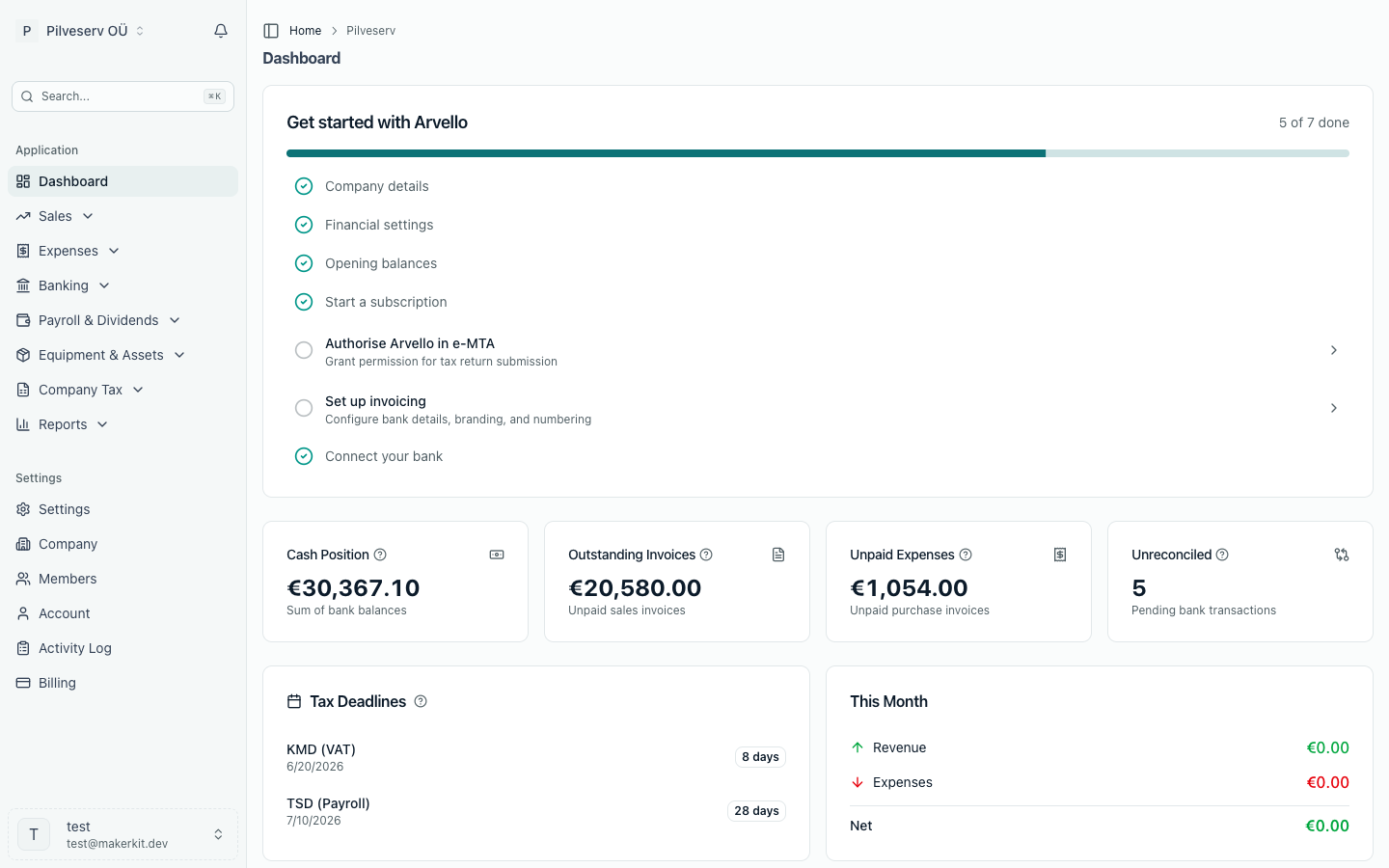
The dashboard is the first thing you see when you open your company in Arvello: how much money you have, who owes you, what you owe, and what EMTA (the Estonian Tax and Customs Board) expects from you next — all on one screen. Every card is clickable and takes you to the detail behind the number.
Needs your attention
At the top, Needs your attention lists what is waiting on you, most urgent first. Each row has a button to the page where you deal with it, and a row only appears when it applies:
- An overdue KMD or TSD: the oldest period whose due date has passed and whose return hasn't gone to EMTA. Arvello works this out from the deadline calendar, from the month your books in Arvello begin, not just from the returns you've prepared. A month you never prepared still shows, and a later return you've filed doesn't hide an older one you missed. For the KMD, a month counts when a VAT registration covers it. For the TSD, a month counts when it has a return, or when something is waiting to be declared in it (costs for Annex 5 or 6, or a staff meal, gift or event). A month with nothing to declare never shows. Open return opens the period's return. If there's no return yet, Open VAT returns or Open TSD returns takes you to the list where you prepare it. If nobody has said who files that return yet, Choose who files takes you to the Opening balances page to answer; members who can't change the books get the returns page instead. The Tax Deadlines card moves on to the next period once a date passes, so an unfiled return is listed here until you file it, and "You're all caught up" doesn't show while one is. A KMD doesn't appear when its period is filed another way (an amendment, or someone else files it), and neither does a TSD for a month someone else files. A company on a longer VAT period files its KMD in e-MTA itself, so its KMD never appears here.
- A filing due within three days, with a button to the page where you prepare it: Open VAT returns for the KMD, Open TSD returns for the TSD, and so on. A KMD or TSD doesn't appear when its status on the Tax Deadlines card says there is nothing left to file: Filed, You file this outside Arvello, or No payroll or dividends recorded. INF 14 never does, because whether you owe it depends on last year's payments; check the Tax overview in January. If the status says Who files this isn't set yet, the button is Choose who files and goes to the Opening balances page, as the Tax Deadlines card does.
- Bank connections that need reconnecting. Banks share account data only for a limited time; once access ends, new transactions stop arriving until someone who manages the books reconnects on the Banking page.
- Overdue invoices: how many sent sales invoices are past their due date and how much is still outstanding on them.
- This month's payroll, when someone needs a monthly run and there is no payroll run for the month yet: an employee whose employment reaches this month (even with no salary set, since the minimum social tax is owed every month unless they're exempt), or a board member with a fixed monthly board fee whose term reaches it. Owners who take only dividends, and board members with no fee set, don't bring it up.
- Missing receipts: this month's payments with deductible VAT and no receipt attached, and the VAT at risk. The button opens those transactions.
- Bank transactions to reconcile, the same count as the Unreconciled card, with a button to reconciliation.
- Received e-invoices to review, sent to you by suppliers over the Peppol network. See E-invoices & Peppol.
- Employee expense claims to book, submitted by employees with their own login and not yet approved. Open expense claims takes you to the list. See Employee expense claims.
- Employee requests waiting for payroll: changes of details and basic exemption applications sent by employees with their own login. Open People takes you to People, where each waits on the person's page. See Employee logins.
The last six rows (payroll, missing receipts, reconciliation, e-invoices to review, employee expense claims and employee requests) ask you to change the books, so only members who can do that see them: the expense claims need a role that manages Expenses, the employee requests one that manages payroll. A member with read-only access, such as an advisor, sees the filings, the overdue invoices and the bank connections to reconnect.
When nothing is waiting, the list is a single line: "You're all caught up."
The four numbers at the top
- Cash Position — your money across bank and cash accounts. Where a connected bank has reported a balance, that fresher figure is used (with its as-of date shown); anything not yet reconciled appears as a separate "not yet in the books" line rather than being silently absorbed. Clicks through to your transactions in Banking.
- Outstanding Invoices — the total your clients still owe on sent sales invoices. Clicks through to Invoicing.
- Unpaid Expenses — the total you owe suppliers on unpaid purchase invoices. Clicks through to Expenses.
- Unreconciled — the count of bank transactions not yet matched to an invoice, expense or account entry. Clicks through to the pending transactions, ready for reconciliation.
Deadlines
The Tax Deadlines card counts down to your next filings: the KMD (VAT return), due by the 20th of the month, and the TSD (payroll taxes), due by the 10th, plus the OSS or IOSS return, motor vehicle tax or INF 14 when they apply. When a KMD or TSD date falls on a weekend or public holiday, the card counts down to the next working day instead. The badge turns amber when a deadline is three days away or less. Once a date has passed, the card moves on to the next one; a return still unfiled then shows as overdue under Needs your attention. The full rhythm is laid out in the Estonian tax calendar.
Under the KMD and the TSD, the card shows where that period's return stands:
- Not started: there is no return for the period in Arvello yet, and Arvello files it. For a TSD, this means something is waiting to be declared that month: costs for Annex 5 or 6, or a staff meal, gift or event (a fringe benefit on Annex 4).
- Draft or Ready to file, with the amount the return shows to pay, or for a KMD the VAT to reclaim.
- Rejected by EMTA: open the return to see why.
- Filed: the return has gone to EMTA, or is on its way.
- You file this outside Arvello: someone else files that period, such as your accountant, or it is before the month Arvello took over filing.
- Who files this isn't set yet: nobody has said who files this return. Arvello doesn't create a TSD until you do, so it can't tell whether one is owed. Select the deadline to answer on the Opening balances page. Until then the deadline counts as unfiled.
- No payroll or dividends recorded: Arvello files the month's TSD, there is none for the month, and nothing is waiting to be declared. Arvello creates the TSD when you approve a payroll run or pay a dividend, so the month has nothing to declare.
If EMTA has approved a longer VAT period for your company, you file the KMD in e-MTA yourself, so the card shows no status under it.
Charts
Three charts show how the company is doing, each on the basis of the report it summarises, so they always agree with your reports. Revenue, costs and their categories are on the Profit & Loss report's basis: excluding VAT and including payroll costs. Cash is the cash and bank accounts on the Balance Sheet.
- Revenue and costs shows each of the last 12 months side by side, with this financial year's profit (or loss) so far above it.
- Cash shows the money in the books at the end of each of the last 12 months, with this month's point at today, and gives the figure in the books today. It uses only your books, while the Cash Position card also uses the balances your banks report, so the two can differ while bank transactions are still waiting to be reconciled.
- Where costs go ranks this financial year's costs by category, with the rest grouped as Other. A category that credits took below zero gets no bar of its own but still counts in Other, so the list adds up to the year's costs. Click a category to open its entries in the general ledger.
The setup checklist
Until your company is fully set up, the dashboard leads with a checklist and a progress bar. Each item unlocks a piece of Arvello:
- Company details and Financial settings — completed by the setup wizard; editable later in Company settings.
- Opening balances — your starting balances, so reports are accurate from day one. See Import your financial history.
- Start a subscription — choose a plan to unlock all features. See Plans & billing.
- Authorise Arvello in e-MTA — grant permission in EMTA's online portal so Arvello can submit tax returns on your company's behalf. See Submitting to EMTA.
- Set up invoicing — bank details, branding and invoice numbering, so invoices go out looking right. See Invoicing.
- Verify your company for e-invoicing — appears once e-invoicing registration is underway; a short identity verification required by the Peppol network. See E-invoices & Peppol.
- Connect your bank — link an account so transactions import and reconcile automatically. See Connect your bank.
Tick everything off and the checklist quietly retires — from then on, the dashboard leads with your numbers.