VAT & KMD returns
How Arvello calculates Estonian VAT and prepares the KMD return from your invoices and expenses, ready to file with EMTA by the 20th of each month.
If your company is VAT-registered, the routine is the same every period: you charge VAT on your sales (output VAT), you pay VAT on your business purchases (input VAT), and you declare the difference to EMTA — the Estonian Tax and Customs Board — on a return called the KMD. Charged more than you paid? You owe the difference. Paid more? You're due a refund. (Registration becomes mandatory once your turnover exceeds €40,000 in a calendar year, unless all of it is exempt or 0%; see what counts.)
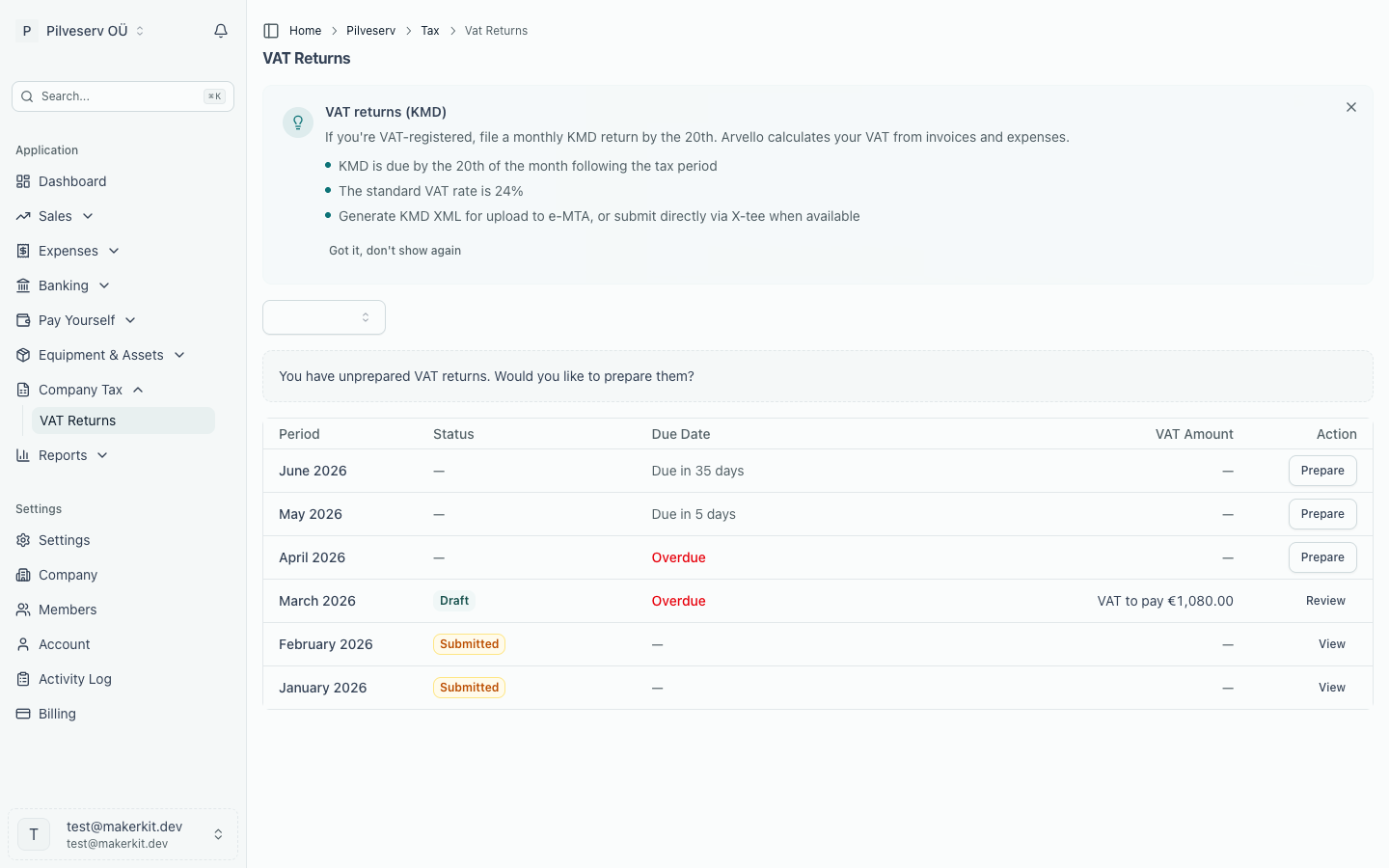
Arvello prepares the KMD for you. Every figure is assembled from the sales invoices and purchase invoices already in your account, so most of the work happens long before the deadline — when documents are entered, coded and reconciled.
Periods and deadlines
The standard VAT period in Estonia is the calendar month, and the KMD for each period is due by the 20th of the following month, or the next working day when the 20th is a weekend or public holiday. EMTA can set a longer period for a company on its reasoned request (VAT Act § 27 lg 4); the return then covers the whole period and is due by the 20th of the month after it. Arvello prepares monthly returns only. If your VAT period in company settings is set to quarterly, Arvello still shows each month's figures but won't approve or file them: you file the longer-period return in e-MTA yourself. The VD (intra-EU sales report) stays monthly, due by the 20th (VAT Act § 28 lg 2), and is filed in e-MTA too. Arvello shows a due date against every return, so the 20th is hard to miss.
What Arvello does automatically
- Builds a draft return for any period from your invoices and expenses, line by line
- Keeps drafts up to date as documents change or bank transactions are reconciled
- Runs a review checklist over the period before you approve anything
- Generates the official KMD XML files for filing, and locks the period once approved
The Company Tax group in the sidebar opens on the Overview — a single dashboard for every tax your OÜ pays, described below — with VAT Returns as its own page beneath it.
Foreign services without a VAT registration
A company that isn't VAT-registered still owes Estonian VAT on some services it buys from foreign businesses. From the day it receives one, it has to register as a limited taxable person (piiratud maksukohustuslane), applying to EMTA within three working days, and pay VAT at the Estonian rate on those services, with no deduction (VAT Act § 21(1) and (3), § 25(1)). The services are the ones listed in § 10(5), the same list as in How a line gets its code: advertising (such as Meta or Google Ads), software and other electronically supplied services, consulting, data processing, licences and the rest.
It doesn't apply to everything bought abroad. A hotel, a meal, an event ticket, passenger transport or short-term car hire abroad is supplied where it takes place (§ 10(4)), and goods are taxed under other rules. Goods bought from other EU countries bring the same registration only once they pass €10,000 in a calendar year (§ 21(2)); the threshold counts only goods acquired from other EU countries. Goods from outside the EU are imported: their VAT is charged at import through the customs declaration, not under § 21. A foreign supplier registered for VAT in Estonia charges Estonian VAT itself, so it doesn't apply either.
When your company isn't VAT-registered on the date of an expense and the supplier's country isn't Estonia, Arvello shows a note on the expense form, and the dashboard and Taxes overview show a card listing those purchases. Neither blocks anything. A card payment you categorise straight from the bank screen, without recording it as an expense with a supplier, isn't checked: Arvello can't tell from a bank line where the merchant is. Monthly charges from Google, Meta, OpenAI and the like are the usual case, so check those yourself. To clear the card:
- if the company registers as a limited taxable person, add the registration under Settings → VAT registrations with the kind Limited taxable person and the date it applies from
- if a supplier is actually in Estonia, correct its country on the supplier's page
- if the purchases aren't services from that list, dismiss the card; it comes back when another such purchase is recorded
Arvello can't prepare the limited taxable person's VAT return, or book that VAT, yet. Record these purchases with Not subject to VAT at the amount paid, and declare the VAT on a KMD in e-MTA for each month you receive such a service, by the 20th of the next month. That VAT can't be deducted, so it is part of the cost and a debt to EMTA, but it won't show in your Arvello books until Arvello books it. Expenses dated while a limited registration is in force show a note saying so.
In this section
- Tax overview — one dashboard for all your company's taxes: upcoming deadlines, tax accrued so far this year, and the status of your latest filings.
- Preparing a KMD return — how a return is generated, tracing any figure back to its documents, and the review checklist.
- Submitting to EMTA — authorising Arvello in e-MTA and filing each period's return.
- Amending a return — what to do when something changes after submission.
- VAT rates & tax codes — the rates Arvello applies and how each tax code feeds the KMD.
- EU One-Stop Shop (OSS) — when VAT on sales to consumers in other EU countries moves to their country's rate, how to invoice under the OSS, and the quarterly OSS return.
- EU import scheme (IOSS) — goods worth up to EUR 150 sent straight from outside the EU to EU consumers: the IOSS registration, IOSS invoices and CSV order imports, and the monthly IOSS return.