Clients & suppliers
One contact directory for customers and suppliers, with Estonian Business Register lookup by registry code and EU VAT number verification against VIES.
Arvello keeps a single contact directory: the companies and people you invoice, and the ones who invoice you.
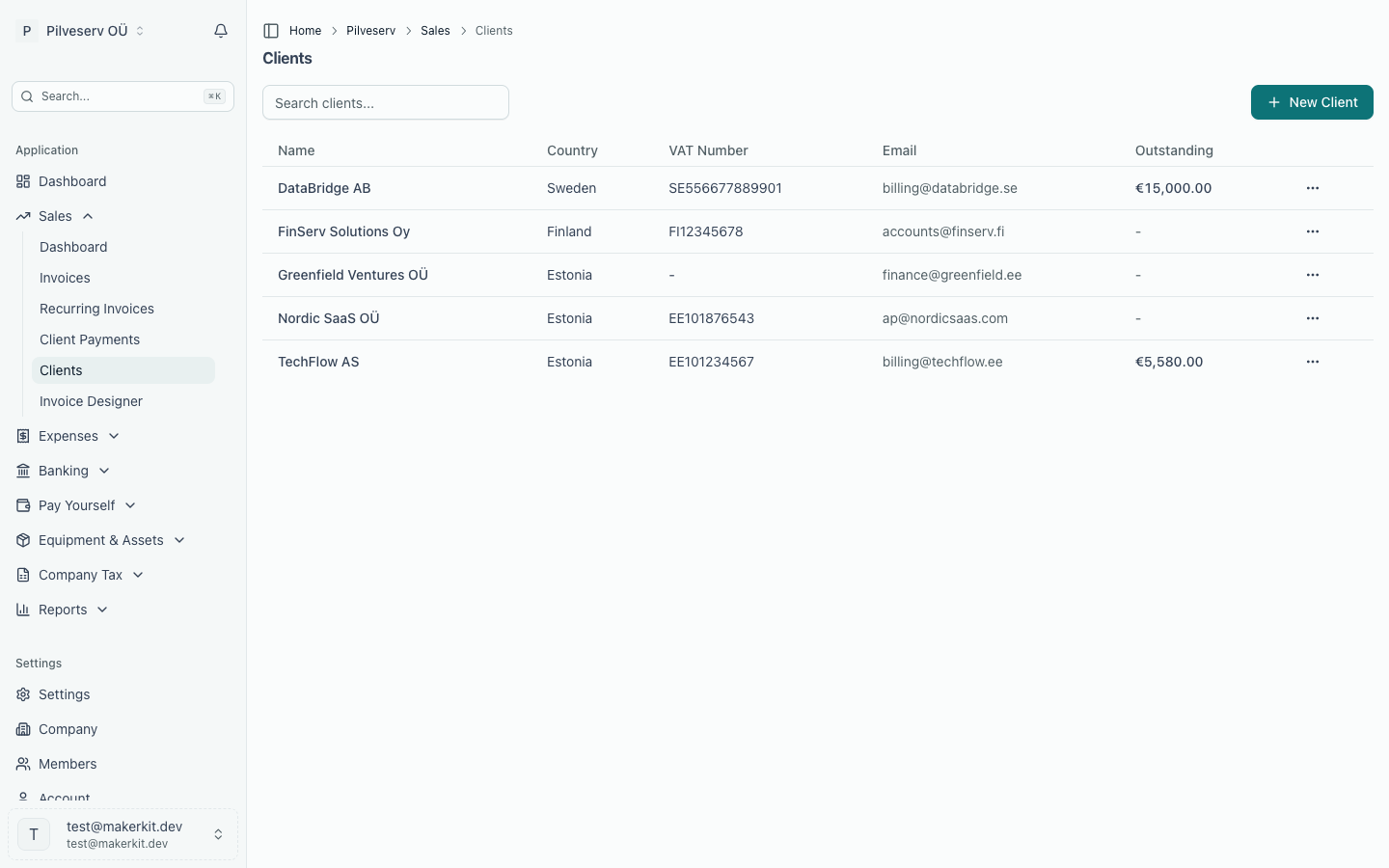
You meet the same directory in different places: Sales → Clients shows contacts marked as customers, and Expenses → Suppliers lists the ones who bill you.
Adding a contact
Where you add a contact decides whether it is a client or a supplier. Add clients under Sales → Clients, or with Add Client on the invoice form without leaving the invoice. Add suppliers under Expenses → Suppliers, or with Add Supplier on the expense form.
When you add a client, first choose the Customer type: Business or Private individual. A business gets the registry lookup and a VAT number field. A private individual (someone buying for themselves, not for a company) just needs a name, and can't hold a VAT number or registry code. The choice records whether you sell to a business or a consumer, which matters for VAT when the client is outside Estonia: it decides the default tax code for clients outside the EU, and for clients elsewhere in the EU once your company is registered for OSS (see VAT rates & tax codes). It matters for Estonian clients too: the KMD INF annex lists a business by its registry code and never a private individual — see Preparing a KMD return.
For Estonian companies, the quickest route is the registry lookup: type the company's name or its 8-digit registry code (registrikood — the company's number in the äriregister, Estonia's Business Register) into the Name field and pick the company from the list. Arvello fills in the registry code, VAT number and address. For anyone else, type the name — no list appears — and fill in the rest yourself.
A company with a registry code can only be in the directory once. Adding it again, from either area, stops with "A contact with this registry code already exists".
A contact record holds:
| Section | Fields |
|---|---|
| Basic information | Customer type (clients: business or private individual), name, registry code (filled in by the lookup), VAT number |
| Invoice defaults | Payment terms in days, default currency, invoice language |
| Contact details | Email, phone, website |
| Address | Two address lines, city, postal code, country |
| Bank details | IBAN (or account number and sort code), bank name, BIC/SWIFT |
| Notes | Internal notes, not shown on invoices |
| Related party | Whether the contact is a related party, and how (see below) |
The supplier form has the same fields, but shows only the name and a default expense category up front; everything else sits under More details.
Two fields earn their keep at invoicing time:
- Email — needed for sending invoices by email; Arvello warns you if a customer has none.
- VAT number — entered with its country prefix (for example EE123456789). Arvello checks it against VIES, the EU's VAT number validation service, in the background when you add the contact or change the number. Verify VAT on the contact's profile repeats the check, but if the number was checked in the last 24 hours it shows that result instead of asking VIES again. The result shows as Valid, Invalid or Unverified. A valid EU VAT number is what triggers the reverse-charge default on invoices to EU businesses. VIES sometimes can't answer, for example when a country's register is offline. The number then keeps its last result (or stays Unverified) and the next check tries again; an outage never marks a number Invalid. Changing a VAT number resets it to Unverified until VIES checks the new one.
The country and VAT number together decide which tax code new invoice lines default to — details in VAT rates & tax codes.
A business outside Estonia has two more fields, for when it's registered with EMTA:
- Estonian VAT number — its Estonian (EE) VAT number, if it's registered for VAT in Estonia. A supplier with one charges Estonian VAT, so its expense lines start on the standard rate instead of a reverse-charge code (see Purchase invoices).
- Estonian non-resident code — the code EMTA's register of taxable persons gave it. The KMD INF annex lists a foreign partner under this code: in Part A whenever it has one, in Part B only when it also has an Estonian VAT number. Without it, the business is left off the annex (see Preparing a KMD return).
Related party marks a contact the annual report has to disclose dealings with: a shareholder or board member, their close family, a company any of them controls or significantly influences, or a company in the same group. The groups are the Business Register's own. A small company's related-party note then lists the year's sales to and purchases from each marked contact, and what they owed or were owed at the year end, across every account their invoices post to (see Preparing the annual report). A contact you don't mark is left out of the note, so mark them before you prepare the report.
Suppliers also carry a default expense category, which pre-fills when you create expenses from them. And if a contact has an Estonian registry code, Arvello checks the Peppol Directory (Peppol being the pan-European e-invoicing network) and badges contacts who accept e-invoices — see E-invoices & Peppol.
How contacts link to invoices
Opening a client gives you three tabs: Overview (the record, VAT status and e-invoicing badge), Invoices and Activity (a log of changes to the record). A supplier's profile has an Expenses tab in place of Invoices.
Editing a client or supplier changes new and draft documents only. A finalised invoice keeps the details it was issued with, on its PDF, its e-invoice and the VAT return annexes alike; see Who the invoice was issued to.
The Invoices tab is where the directory pays off: it lists your 20 most recent sales invoices to that client, with their statuses and totals. A supplier's Expenses tab does the same for purchase invoices received from them. The clients and suppliers lists also show each contact's outstanding balance, so the directory doubles as a quick who-owes-what. The balance is in euros: an invoice raised in another currency is counted at the exchange rate stored on it, while the Invoices and Expenses tabs still show each invoice in its own currency.
A client's payment terms and currency pre-fill every new invoice to them — the payment terms set the due date — and their invoice language sets the language of the labels on their invoice PDFs. One decision instead of one per invoice.