The purchase inbox
Forward receipts and invoices to Arvello, let it read them and find the bank payment, then save each one as an expense in a click or two.
Expenses → Inbox is where your purchase documents land: receipts and invoices you forward by email or upload, and e-invoices your suppliers send over Peppol. Arvello reads each document, looks for its bank payment, and turns it into an expense with Save as expense. Keeping the documents themselves, and spotting the ones missing, is covered in Receipts & documents.
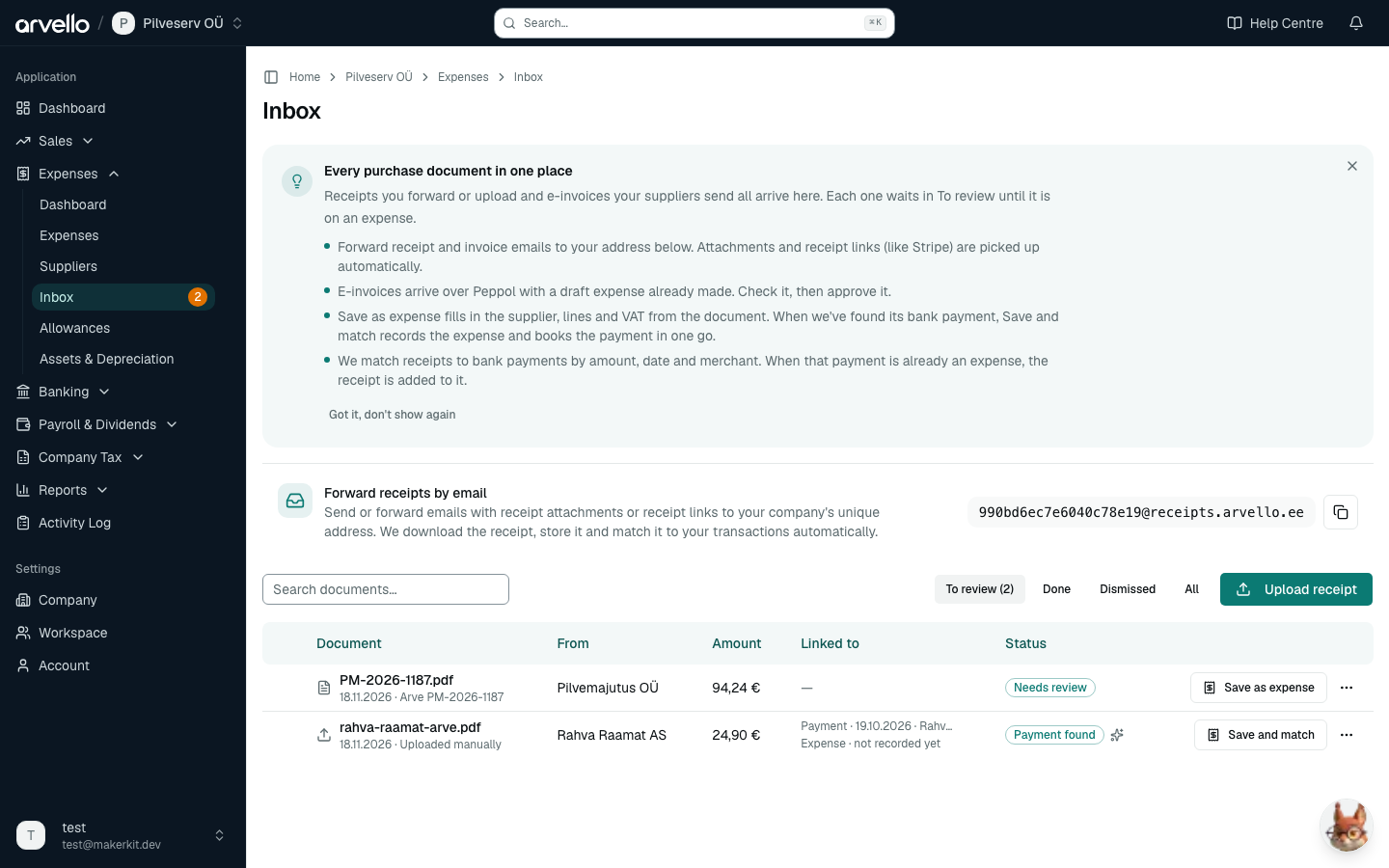
Forwarding receipts by email
Every company has its own receipt address. You'll find it on Expenses → Inbox, in the Forward receipts by email card — press Copy address and save it as a contact in your mail app. Then, whenever a receipt lands in your inbox, forward it there (or set it as the billing email with suppliers that only ever send receipts).
What happens to a forwarded email:
- Attachments are saved. PDF and image attachments are stored as receipts. If the email has no attachment but links to a hosted receipt — a Stripe receipt, for example — Arvello downloads the receipt from the link instead. A Bolt Business monthly report becomes one receipt per ride (see Bolt Business ride reports).
- A file Arvello already has is skipped. Each file is stored once, so a receipt you already uploaded in the inbox isn't stored or matched again when you forward it.
- Arvello looks for the matching payment. It reads the receipt file itself (see How documents are read) and searches your bank transactions for the outgoing payment of its amount, around its date. The email's text only fills in what the file doesn't show, or stands in when the file can't be read. A clear match is linked automatically. If that payment is already recorded as an expense, the receipt is added to that expense's receipts too, so it stops counting as awaiting one; if you record the expense from the payment later, the receipt is added to it then. Undo that booking, and a receipt Arvello added comes off the expense again, ready for the right one. For a card payment in another currency, the receipt's own amount (say, 25.00 USD) is matched to the payment that names it, even when your bank books only the euro amount and states the foreign one in the payment's text, as Wise does; such a match also needs the merchant's name to match. An email that carries both an invoice and a receipt for one charge, as Stripe's do, has both files linked to that one payment.
- A receipt that arrives before its payment waits for it. Every bank sync and statement import looks again for the payments of receipts still in Needs review from the last 120 days, so a receipt forwarded on the day of purchase is linked once the payment shows up. A payment that already has a receipt isn't given a second one this way, except a file from the same email as that receipt.
- Anything unclear waits for you. A receipt with no clear match shows as Needs review, with a badge next to Inbox in the sidebar and a notification. Use Save as expense to record it (see Saving a receipt as an expense), Link to expense in its menu to put it on an expense you already recorded, or Dismiss it if it isn't a business receipt. The notification clears itself once no forwarded receipt is waiting for review. If an email contained no receipt at all, you get a notification saying so.
Link to expense lists your expenses, the ones for the receipt's amount first. Linking adds the receipt's file to the expense's receipts, where the expenses list, the Awaiting Receipts count and the VAT return's checks see it; unlinking or deleting the receipt takes it off again.
Bolt Business ride reports
Bolt Business doesn't email an invoice for each ride. Once a month it emails a report (user_invoicing_report_….csv) listing the rides, each with a link to its invoice. Forward that email to your receipt address as it is:
- Each ride becomes its own receipt. Arvello downloads the ride's PDF invoice from Bolt and stores it as the receipt. The invoice is issued by the driver, or the company they drive for, and that name is shown next to Bolt as the merchant. Its invoice number fills in Supplier Invoice / Reference when you record the expense from the payment.
- Each ride is matched to its own card payment. Arvello looks for a payment to Bolt of the ride's amount, around the day the ride ended. The receipt shows the invoice total. Where part of a ride was paid from Bolt Balance, Arvello looks for what your card was charged instead, as your bank shows it. A ride no card paid (Bolt Balance only, or billed monthly) isn't matched automatically. A payment that doesn't name Bolt isn't matched to a ride, even when the amount fits, and neither is a payment that already has a receipt.
- The rides of everyone in the report are added. Each ride's invoice is made out to the company. A ride someone paid with their own card has no company payment to match, so it waits in Needs review.
- Forwarding a report again adds only the rides that are missing. A ride Arvello already has isn't stored twice.
- The rider's details stay out. Arvello doesn't keep the rider's name, phone number, email or the addresses listed in the report, and the invoices it downloads aren't sent to Claude: the report already gives the amount, date and supplier. The invoice itself shows where the ride started, as Bolt prints it. A ride invoice you upload yourself is read like any other upload (see How documents are read).
- If Bolt's invoice can't be downloaded, Arvello tries again over the next few hours. If a ride still can't be added after that, you get a notification: forward the report again to retry. A large report can need more than one forward. A row of the report that can't be read gets a notification of its own: download that ride's invoice from Bolt and upload it.
If Bolt bills your company once a month instead of charging a card for each ride, the month's one payment goes with Bolt's monthly invoice, which you can forward too. The rides then wait in Needs review: use Link to expense to put them on that month's Bolt expense, or Dismiss them.
The driver usually isn't VAT registered, so the ride invoice shows no VAT and there is no input VAT to reclaim. Record such rides without VAT; only a ride whose invoice shows VAT has any to reclaim. Arvello does this for you: when you record the expense from a ride's payment, the form starts with Not subject to VAT, and a bank rule that records your Bolt payments as expenses records such a ride as Not subject to VAT, whatever tax code the rule has. The rule leaves two kinds of ride for you to record: one partly paid from Bolt Balance, where the payment is less than the invoice, and one whose invoice shows VAT, because it's issued by a VAT-registered taxi company rather than by Bolt and the expense should name that company. When you record one of those yourself, the form shows the invoice total next to what the card paid.
If the report arrives after the ride's payment was already recorded as an expense (by a rule that ran first, for example), the ride's invoice isn't added to an expense it doesn't support: one that deducts VAT the invoice doesn't show, or any expense for a ride a rule would have left to you. The receipt stays on its payment, showing Payment found, and the expense keeps counting as awaiting a receipt. A supplier credit note isn't the way to fix a booking error: open the expense, use Correct to record it without VAT (see Correcting a finalised expense), then use Link to expense on the receipt. To have later rides recorded right, give your Bolt rule the tax code Not subject to VAT, or forward the report before the rule books the month's payments.
Where a document has got to
Expenses → Inbox lists your receipts with your e-invoices. Its Status column says how far each receipt has got:
- Needs review: Arvello hasn't found its payment. Use Save as expense, or Dismiss it.
- Payment found: the receipt is linked to its bank payment, but not to an expense yet. While the payment waits in Banking → Reconciliation and you can book bank payments, the row's button is Save and match. When the payment was booked without an expense or excluded, it already carries the cost, so the button is Link to expense, for the expense it belongs to. The same goes for a payment dated on or before your opening balances: they already carry it. In other cases (you took this receipt off an expense before, or you can't book bank payments) the button is Save as expense.
- On expense: the receipt is on an expense, and the job is done.
- Dismissed: set aside. Restore brings it back.
While a Save button is shown, Link to expense is in the row's menu, for an expense you recorded some other way. A sparkle next to the status means Arvello made the match (point at it to see Found automatically). Linked to shows the payment (its date and payee) and the expense on separate lines, with not recorded yet until there is an expense. The inbox opens on To review: receipts not on an expense yet, and e-invoices still to approve. Done, Dismissed and All show the rest.
Forwarded receipts are listed with the source Forwarded email, next to the ones you upload on the same page with Upload receipt. An uploaded receipt is read and matched to its payment as soon as it's uploaded, and the confirmation says when it was linked; one that isn't waits in Needs review like a forwarded one.
Saving a receipt as an expense
Save as expense opens the expense form filled in from what Arvello read on the document (see How documents are read). Check it, change anything that's wrong, and save.
- Supplier. The supplier whose registry code, or else VAT number, the document prints. Never matched on the name alone: two companies can share one. When none of your contacts has it, the form says the seller isn't one of your suppliers yet, and Add this supplier opens the new-supplier form with the name, registry code, VAT number and IBAN from the document filled in.
- Expense account. The account the supplier's recent expenses went to (at least three quarters of the lines of its last five), else the supplier's default expense account.
- Lines. One line per line the document prints, when they add up to its total. When they don't, or some lines are discounts, or there are more than 20, one line per VAT rate; and one line for the total when even that doesn't add up. Each line starts with the VAT the document shows for it, as described under How documents are read, so a hotel bill's room at 13% and minibar at 24% get a line each.
- Dates. The invoice date, the due date and, when the document names one, the billing period. Invoice received is the day the email arrived, or the day you uploaded the file, however long it waited in the inbox: an invoice that arrives after its month's VAT return was filed goes on the return for the month it arrived. A billing period fills Billing period from and Billing period to: its last day is the delivery date, which decides the VAT return the purchase goes in (see Which VAT return a purchase goes on). Clear Billing period from if the invoice is for a single delivery.
- Invoice number. It fills Supplier Invoice / Reference, and the form warns if you've already recorded an expense from this supplier with that number.
Saving makes a draft expense with the receipt attached, and the receipt moves to Done. Finalise the draft as any other (see Purchase invoices). If you save the same receipt again, in another tab say, Arvello says it's already on an expense and records nothing.
When your books in Arvello start from an earlier year's balances, an invoice dated on or before the opening balances is already in them as a bill owed to the supplier, so Arvello doesn't record it as an expense, here or with Save and match. (A company whose books start at its incorporation can record a bill from its founding day.) When it's paid, book the payment to 2000 Accounts payable in Banking → Reconciliation.
Save and match
When Arvello has found the receipt's payment and it waits in Banking → Reconciliation, the button is Save and match. The form is the one the reconciliation page opens for that payment: its amount is the payment, less any bank fee booked on its own, and the expense is finalised and the payment booked to it when you save, so you don't go to the reconciliation page. The document's lines are used when they add up to the payment; otherwise one line carries it. If the payment was booked in the meantime, nothing is saved and Arvello says so: open the receipt from the inbox again. If the expense is saved but the payment doesn't settle it, Arvello says that too: match the payment to the expense rather than recording it again.
Saving and matching needs a role that can book bank payments as well as manage expenses. Without it, the button is Save as expense. Once the draft is finalised, Arvello books the payment to it when the amount is exact and either the payment's reference names the invoice number, or no other unpaid expense has that amount and the payee's name or IBAN matches the supplier; otherwise someone who can book payments matches it in Banking → Reconciliation.
E-invoices
An e-invoice arrives with its draft expense already made, so it has Approve & Post instead (see E-invoices & Peppol). Approving also looks for its bank payment, and books it to the expense when the amount is exact and either the payment's reference names the invoice number, or no other unpaid expense has that amount and the payee's name or IBAN matches the supplier.
Opening a receipt
Click a receipt's name to open it. Its page shows the file next to what Arvello read from it (date, total, invoice number and VAT), the payment and expense it's linked to, and the same actions as the row's menu. A receipt that isn't on an expense yet lists the expenses it might belong to, those of its amount or invoice number and close to its date, each with a button to link it.
When the receipt and the expense disagree on VAT
Arvello compares the VAT on the receipt with the expense it's on, or the expense its payment is booked to. It flags an expense that deducts input VAT when the invoice:
- says the VAT is reverse charged. Software and online services from abroad often do: the invoice shows 0% and a note such as "Tax to be paid on reverse charge basis". The seller charged no VAT; you calculate it yourself, and the expense is recorded as a reverse charge (EU or non-EU supplier) instead;
- charges no VAT;
- charges another country's VAT, which isn't Estonian input VAT and can't be deducted on your KMD;
- shows a different amount of Estonian VAT from the expense;
- is a till receipt, not an invoice (see A till receipt is not an invoice). The expense isn't flagged when it has another document attached, which may be the invoice.
A till receipt is still added to its expense: it proves the cost, even though the VAT needs an invoice. Any other receipt whose VAT doesn't match isn't added on its own to an expense recorded before it arrived: it stays on its payment, showing Payment found and VAT differs, and the expense keeps counting as awaiting a receipt. The receipt's page and the expense's page say what differs and which VAT the invoice shows. Set the expense's line to that VAT, with the invoice's total as its amount: on a draft by editing it, on a finalised expense with Correct (see Correcting a finalised expense). A correction adds the receipt to the expense on its own; after a draft's edit, link it. A receipt you link by hand stays linked, and the expense's page keeps showing the difference.
How documents are read
Arvello sends the receipt file (a PDF, JPG, PNG, GIF or WebP) to Anthropic's Claude, which reads its total, currency, date, the name of the business that issued it, its invoice number and its VAT: the amount, the rate, whether it says the VAT is reverse charged, and the seller's VAT number. It also reads what kind of document it is: an invoice that names your company, a passenger-transport ticket or machine printout (a simplified invoice), or a till receipt. The receipt's page shows this as Document type. For Save as expense it also reads every line the document prints, with its amount and VAT rate, the seller's registry code, the IBAN and reference number to pay with, the due date and the billing period. Nothing else from your books is sent with it, and Anthropic doesn't use it to train its models.
What it reads is used to:
- find the bank payment. A wrong match can be unlinked from the receipt's row or page.
- make the expense. Save as expense fills in the supplier, lines, dates and invoice number from it (see Saving a receipt as an expense).
- fill in the invoice number. It goes in Supplier Invoice / Reference when you record the expense from the payment, and on an expense the receipt is linked to that has none yet. A number already there is never replaced, and an expense in a VAT period whose return is approved or filed is left as it is. Taking the receipt off the expense again (unlinking, removing or deleting it) takes back a number it filled in, but never one you entered.
- start the expense's VAT. When you record the expense from the receipt or its payment, each line starts with the VAT the invoice shows for it: a reverse charge, Not subject to VAT (no VAT, or another country's VAT, which is part of the cost; when what you bought is self-assessed, such as a service from an EU business, its reverse charge stays), or, when the invoice shows the seller's Estonian VAT number, the Estonian rate it charges. A till receipt's lines start as VAT not deductible at their rate instead, or Not subject to VAT when it shows no VAT, a rate Estonia doesn't charge on its date, or several rates on one line (see A till receipt is not an invoice). A bank rule that records the expense does the same, except that a rule's non-deductible VAT code at the invoice's rate stays, and a payment whose till receipt shows no VAT is left for you when the VAT code the rule uses deducts VAT. A company not registered for VAT keeps Not subject to VAT.
- ask about a restaurant bill. The expense form asks whether it was entertainment or a staff meal, and you enter who attended. Claude never guesses the number of people.
- check the VAT of an expense already recorded (see When the receipt and the expense disagree on VAT). It never changes an expense's VAT itself.
Every forwarded or uploaded file is read once, as soon as it arrives. Your plan sets how many files are read a month: 100 on Solo, 300 on Growth and 1,000 on Business. Once a month's reads are used up, the inbox says so at the top: new files are still kept and matched on their email's text, but not read until the 1st of the next month, so Save as expense has nothing to fill in from them and you enter the details yourself. HEIC photos can't be read. A receipt that isn't read is matched on its email's text alone, so an upload then waits in Needs review.
Common questions
A receipt was linked to the wrong payment
Open Expenses → Inbox, use Unlink on the receipt's row, and link it to the right expense yourself with Link to expense. Unlinking takes the file off the expense it was on, and Arvello won't match that receipt automatically again. An automatic match only ever links the receipt; it books nothing, though it may have filled in the expense's invoice number, which unlinking takes back. If the receipt is on a finalised expense, its menu has no Unlink: open the expense, add the right receipt if it has no other, and remove this one there.